- Open-Typer-aarch64.AppImage 47.4 MB 4.7k downloads
- Open-Typer-armhf.AppImage 43.7 MB 2.4k downloads
- Open-Typer-installer.exe 74.4 MB 7k downloads
- Open-Typer-x86_64.AppImage 44.3 MB 2.1k downloads
- Open-Typer.dmg 45.4 MB 381 downloads
- open-typer_5.2.1.focal_amd64.deb 1.5 MB 74 downloads
- open-typer_5.2.1.focal_arm64.deb 1.5 MB 26 downloads
- open-typer_5.2.1.focal_armhf.deb 1.4 MB 29 downloads
- open-typer_5.2.1.jammy_amd64.deb 1.5 MB 37 downloads
- open-typer_5.2.1.jammy_arm64.deb 1.5 MB 24 downloads
- open-typer_5.2.1.jammy_armhf.deb 1.5 MB 21 downloads
- open-typer_5.2.1.lunar_amd64.deb 1.5 MB 30 downloads
- open-typer_5.2.1.lunar_arm64.deb 1.5 MB 24 downloads
- open-typer_5.2.1.lunar_armhf.deb 1.5 MB 24 downloads
Typing test: open-source desktop tutor
A local typing test that runs on hardware you control keeps lesson packs, timed drills, and keyboard layouts on your desk instead of an advertising funnel. Open-Typer does that work as a GPL-3.0 tutor: take the current Windows installer from GitHub Releases (or macOS and Linux builds), open the window, then finish a lesson without creating an account.
- Practice lessons locally without an account
- Windows installer plus macOS and Linux from GitHub Releases
- GPL-3.0 tutor with packs, layouts, and timed drills
By Stroke Quill editorial team Current release, published August 15, 2023
Install Open-Typer 5.2.1
Windows
Paste into PowerShell or Command Prompt:
Open-Typer-installer.exePackage: GitHub Releases Windows installer Open-Typer-installer.exe on Open-Typer/Open-Typer. No winget package id was found on microsoft/winget-pkgs on this review date; do not invent one. Installer run UNVERIFIED on a real Windows machine..
Other Windows commands
Or download the file directly from the official GitHub release:
Download Windows installer (.exe)Windows desktop. Prefer Open-Typer-installer.exe from the current Open-Typer/Open-Typer tag. Binaries are unsigned per upstream docs; SmartScreen may warn.
macOS
Paste into Terminal:
Open-Typer.dmgPackage: GitHub Releases macOS DMG Open-Typer.dmg on the same Open-Typer/Open-Typer tag. Homebrew cask was not found on this review date; do not invent one. DMG open UNVERIFIED on a real Mac..
Other macOS commands
Or download the file directly from the official GitHub release:
Download macOS DMGmacOS. Prefer Open-Typer.dmg from GitHub Releases. Upstream notes binaries are unsigned; right-click Open on first launch if Gatekeeper blocks.
Linux
Paste into your terminal:
chmod +x Open-Typer-x86_64.AppImage && ./Open-Typer-x86_64.AppImagePackage: GitHub Releases Open-Typer-x86_64.AppImage on the same tag as the Windows installer. Snap open-typer and Ubuntu debs also ship. AppImage run UNVERIFIED on a real machine..
Other Linux commands
Snap Store
sudo snap install open-typer Debian / Ubuntu .deb (jammy amd64)
sudo apt install ./open-typer_*_jammy_amd64.debOr download the file directly from the official GitHub release:
Download Linux x86_64 AppImageAlso on this release: Linux aarch64 AppImage, Linux armhf AppImage, Ubuntu jammy amd64 .deb, Ubuntu focal amd64 .deb, Ubuntu lunar amd64 .deb
A desktop Linux session. Prefer Open-Typer-x86_64.AppImage from GitHub Releases when you want the same tag as the Windows installer, or use snap open-typer / matching .deb when your distro fits.
Every file comes from Open-Typer/Open-Typer v5.2.1 on GitHub, the project's own release, unmodified.
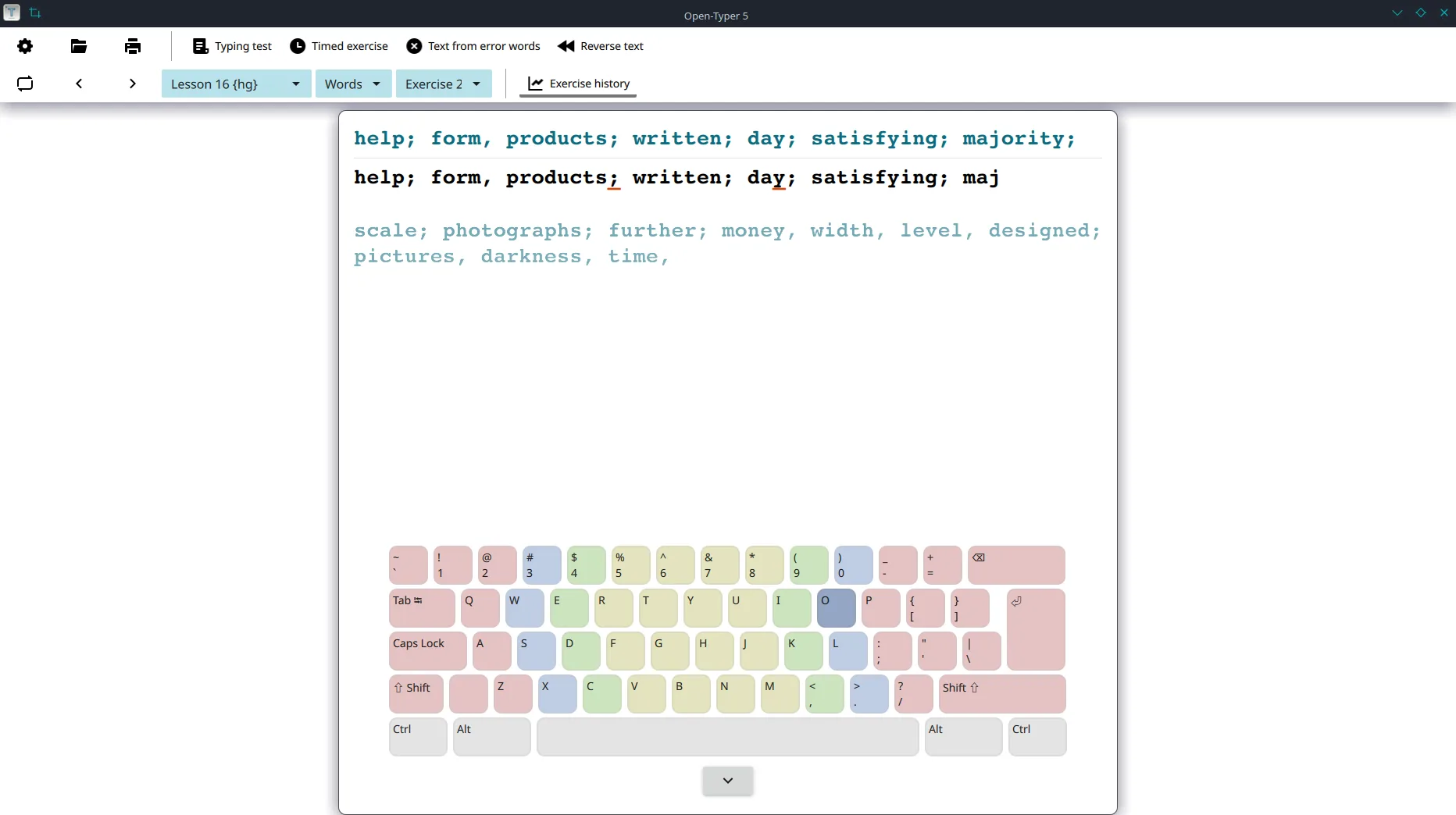
People searching for a typing test usually want software they can install and trust, not another advertising page that wraps a browser drill. Keep this typing test install on GitHub Releases for Open-Typer/Open-Typer when you want a named binary, prove one finished lesson, then explore themes only after that path works.
Here typing test means software that shows lesson text, measures accuracy and speed, and stores progress on a machine you own. Open-Typer is the GPL-3.0 product this guide maps. Source and downloads live on Open-Typer/Open-Typer. The release door is GitHub Releases. Docs: open-typer.github.io/docs. Safe download path: download-safe path. Repo layout: GitHub overview. Which file: releases.
What a typing test job needs
A typing test job on a personal PC needs software that can open a lesson, keep progress on disk you understand, and leave advertising portals for people who only want a disposable browser tab. You choose a local tutor, keep sources on Releases, and avoid surprise toolbars mid-setup. A desktop typing test for offline practice reduces logins that only work while a vendor site stays up.
Open-Typer keeps that work on your machine. You install once, start a pack lesson, type through touch and word drills, and leave the window running. The everyday win is fewer half-finished “best typing test download” pages than chasing a new website for every session.
GPL-3.0 builds
The project license on GitHub reports GPL-3.0. Free open-source downloads cover the Windows installer, macOS DMG, Linux AppImages, and Ubuntu debs on the same tag. Safety notes: is it safe.
GitHub Releases door
Windows Open-Typer-installer.exe ships with macOS and Linux assets on the current tag. Prefer those exact names from Open-Typer releases.
Offline first
The product runs lessons on your desk. Browser practice remains optional later, not a required signup before the first typing test session.
- Prefer GitHub Releases over adware “typing test download” portals.
- Prefer the named Windows installer; no winget id was found here.
- Expect unsigned-binary warnings per upstream docs on first launch.
- Document the update door after the first successful lesson.
Why this desktop path
Local typing test work fails when the installer comes from a renamed mirror and the update door never gets written down. Open-Typer from Releases keeps filenames stable enough to put on a ticket: Windows installer, macOS DMG, Linux AppImage, snap, or matching .deb. Browser sites still exist for quick drills, yet everyday installs prefer named desktop assets.
Browser portals still win when you want a disposable tab with no install rights. Classroom SaaS still wins when a teacher already lives inside a Typing.com roster. Choose this typing test path when you want a GPL-3.0 desktop window that can run lessons without a Softonic wrapper.
No winget or Homebrew package id was found for Open-Typer on this review date. Prefer Open-Typer-installer.exe from GitHub Releases rather than inventing a package manager door.
Install by operating system
Match the OS tab in the panel above. Windows prefers the installer exe. Linux prefers the x86_64 AppImage (or snap / .deb). macOS prefers the DMG on the reviewed tag.
| OS | Primary door | Alternate | Notes |
|---|---|---|---|
| Windows | Open-Typer-installer.exe | No winget found | Prefer current tag installer; UNVERIFIED |
| macOS | Open-Typer.dmg | No brew found | Unsigned DMG; right-click Open; UNVERIFIED |
| Linux | Open-Typer-x86_64.AppImage | snap open-typer or jammy/focal/lunar .deb | Commands UNVERIFIED on a real machine |
Longer OS paths: Windows, macOS, Linux AppImage, Linux snap. Machine chooser: for this computer.
Eight steps to first lesson
- Open GitHub Releases for Open-Typer/Open-Typer Open the official Releases page and confirm you are on a stable tag that ships Open-Typer-installer.exe for this typing test path, not a renamed mirror setup from a review portal.
- Download the Windows installer first Prefer Open-Typer-installer.exe for a normal Windows typing test install. No winget package id was found on this review date, so keep the Releases installer as the Windows door.
- Or take Linux or macOS assets on the same tag On Linux, prefer Open-Typer-x86_64.AppImage (or matching aarch64/armhf). Snap open-typer and Ubuntu debs also ship. macOS can use Open-Typer.dmg. These runs are UNVERIFIED on a real machine.
- Confirm Open-Typer opens Launch the app so the lesson window appears before you chase custom text files, themes, or every layout for this typing test job.
- Start a pack lesson Open a built-in pack, pick a lesson with touch or word drills, then complete one short typing test exercise so the path proves itself.
- Optional appearance and timed drills Set light or dark theme, font, and colors, then try a timed exercise after one clean lesson proves the install.
- Keep one update door Return to the same GitHub Releases filename for the next bump. Skip adware wrappers that only rank for typing test.
- Optional browser practice later Browser sites can stay bookmarked after a desk install works. This install guide does not ask you to trust a Softonic mirror first.
First hour checklist: installed. First-run habits: first run.
First hour after install
Success is a typing test lesson that accepts keystrokes on a machine you control, not three download folders full of renamed setups. Launch Open-Typer, start a pack lesson, then prove one finished drill before you chase every theme or custom text file.
SmartScreen and Gatekeeper prompts are common because upstream binaries are unsigned. Prefer the Releases URL you typed yourself. Safety overview: is it safe. Layouts and drills: layouts and drills.
How to choose a typing test
A careful buyer asks where progress lives, whether source is public, which lesson packs ship built-in, and whether the download door is a named GitHub asset. Browser portals answer with ads and accounts. Desktop tutors answer with files and local packs.
Pick a local typing test when you want lessons on disk and practice without a subscription. Pick a browser portal when you want a disposable tab more than an installer. The criteria stay the same even if you later compare Monkeytype, Keybr, or classroom SaaS.
- Can you install from a filename you can write on a ticket?
- Does the licence let you read the tutor source?
- Can you practice offline after the first download?
- Do packs and settings stay under your control?
Open-Typer compared with other typing test options
The table below is a desk comparison, not a ranking of advertising portals. Browser sites win at disposable tabs. This typing test client wins at local GPL-3.0 practice with named Releases assets.
| Product | Price | Open source | Offline desk app | Signup required | Verdict |
|---|---|---|---|---|---|
| Open-Typer | Free (GPL-3.0) | Yes | Yes | No | Local typing test tutor this guide maps |
| Typing.com | Free + school/premium | No | No (web) | Often for progress | Classroom curriculum, not a Releases installer path |
| Monkeytype | Free | Web community | Browser / PWA | Optional | Fast browser drills, weak durable installer door |
| Keybr | Free | No | No | Optional | Adaptive web lessons |
| Softonic-class wrappers | Free + bundling risk | No | Unknown binary | Installer wizard | Avoid as the download door |
Browser portals still win when you want a quick tab. Classroom SaaS still wins when a teacher needs roster reports. Softonic-class wrappers still fail when you need a named binary. Open-Typer is the typing test path when you want GPL-3.0 builds, exact Releases names, and files on disk. Longer comparison: vs Typing.com.
Free tutor vs ad-funded portals
Open-Typer itself is free under GPL-3.0. GitHub Releases assets named above have no paywall for the client. Upstream docs describe packs, timed exercises, and themes without a store checkout. You may still bookmark Monkeytype or Typing.com for a quick session.
Ad-funded typing test portals sell attention, not a durable installer. Those pages do not replace a local tutor, and this guide does not sell those seats. If you already bookmark a browser drill, keep it until a desk habit sticks.
Mistakes that undo a typing test install
Downloading a second Softonic copy to fix a blocked first run. Expecting website streaks inside an exe without installing. Skipping the first local lesson and jumping into every theme. Mixing snap with AppImage on the same user without notes.
- Take the installer, DMG, or AppImage from GitHub Releases, not a renamed portal.
- Prove one local lesson before chasing every pack.
- Write the update door on the machine ticket.
- Keep browser practice as a fallback, not as the installer.
- Do not invent a winget or brew id that was not found.
Fix each mistake the same way: one honest door, one proven lesson, one documented path. Switch habits: switch from browser typing tests.
Guides index
Install guides cover Windows, macOS, Linux AppImage, and snap. Setup guides cover first run, layouts and drills, safety, and update/uninstall. Comparison and switch pages help when a browser portal is already bookmarked. Browse all: guides.
Repeatable desk habits
A reliable typing test install starts with one named file and one proven lesson, not a pile of renamed setups.
Write the update door on the machine ticket beside the OS version. Windows installer, macOS DMG, Linux AppImage, snap, and .deb are different doors. Mixing them without notes creates duplicate installs and confused uninstalls after a reimage.
Family PCs, club laptops, and lab images all benefit from the same boring rhythm for every typing test desk: one installer door, one documented layout preference, one update bookmark. That is how a local typing test habit stays boring for everyday desks in a good way.
Everyday limits
A typing test on a personal machine still needs an honest binary before fonts or colors matter.
Everyday practice for a typing test on a desk still needs an honest binary, a proven lesson, and a documented update door before themes matter.
Desktop typing test practice does not replace a live classroom roster. It does not make every custom text file a perfect curriculum. It does not remove the need to trust the installer or AppImage you downloaded. Offline use still needs network for the first download.
Settings that matter early
For a typing test that you will keep, set layout and theme once, then practice.
Keyboard layout, light or dark theme, and whether timed drills stay visible matter more than every color accent. Prove a local lesson before you chase every pack. Layouts guide: layouts and drills.
After the first lesson
Treat the next typing test update like the first install: same Releases filename, same ticket note.
Only after one drill finishes should you add custom text files, deep themes, or every language pack. Keep Releases bookmarked. Prefer the same tag family that still ships your OS asset. Update guide: update uninstall.
Keeping the job name clear
Say typing test when you mean a local tutor install, not a random search result that only ranks for the phrase.
Here typing test means a local tutor you install and operate. A review portal that only ranks for the head term is still the wrong binary. Prefer Open-Typer-installer.exe, Open-Typer.dmg, or Open-Typer-x86_64.AppImage, then prove one lesson before you batch themes.
When someone pastes a random “best download” link into chat, ask for the GitHub Releases URL instead. The install path on this guide always returns to Open-Typer/Open-Typer.
Remember the job name: typing test here means a local tutor plus progress you control. A Softonic mirror that only ranks for the head term is still the wrong binary. Prefer the named Releases assets, then prove one lesson before you add optional browser practice.
Ad-funded portals still win when a disposable tab is enough. Browser-only drills still win when install rights are missing. Classroom SaaS still wins for teachers who need roster reports. Choose Open-Typer when you want GPL-3.0 builds, exact Releases names, and a desk path that does not start with a bundled toolbar.
Stroke Quill publishes this typing test install guide. Upstream Open-Typer remains at open-typer.github.io and GitHub. When Releases change which OS assets appear, re-check the live list before you image a lab.
Lab and travel notes
Travel laptops benefit from a single documented installer door written beside the preferred layout. Lab images drift when someone installs a second mirror during a blocked SmartScreen prompt. Prefer returning to the same Releases URL instead of inventing a new download mid-flight.
Shared desks should keep browser typing test practice available as a fallback until the local habit sticks for the whole room. Classroom images should pin the exact filename beside the OS version. After every reimage, prove one short local lesson before you call the machine ready.
That habit catches vanished portable folders and adware shortcuts that reappear from old bookmark exports. Command-line users who prefer AppImage can keep that door while teammates use snap or .deb, as long as the room documents which typing test path is official for demos.
Unsigned binaries need the same note on every lab ticket so a new operator does not treat Gatekeeper as a broken typing test install. Keep browser and desk doors written separately so a reimage never grabs the wrong typing test file.
How do I install a typing test on Windows?
Download the current Open-Typer-installer.exe from GitHub Releases for Open-Typer/Open-Typer and run it. No winget package id was found on this review date, so keep the installer as the Windows typing test door. Guide: install on Windows. Keep one door so the next client bump stays honest. This installer run remains UNVERIFIED on a real Windows machine.
Where should I download a typing test app?
Prefer GitHub Releases for Open-Typer/Open-Typer when you need the Windows installer, the Linux AppImage or .deb, or the macOS DMG. Skip Softonic-style wrappers that rename the setup for a search ranking. Details: download safe. Keep downloads on the project release list so the typing test binary matches the tag you expect.
Is this typing test software free?
Open-Typer is free under GPL-3.0. GitHub Releases assets named above have no paywall for the client. Upstream docs describe packs and themes without a store checkout. This guide does not sell advertising seats or school subscriptions. Browser sites stay optional beside the desk install.
Can I switch into this typing test from a browser site?
Yes. Install Open-Typer, prove a local lesson, then keep the browser bookmark only as a fallback if you still want a disposable tab. Guide: switch from browser typing tests. Comparison context: vs Typing.com. Portal streaks do not transfer into a desktop window automatically.
Does the desktop typing test work offline?
After the first download, Open-Typer can run lessons offline with local packs. You still need network for the first installer, DMG, or AppImage fetch. Offline habits: first run and first hour. A desk install does not require a website account.
Official releases
All releases on GitHub- GitHub stars
- 74
- Downloads, last 3 releases
- 17k
- Latest version
- 5.2.1
5.2.0
v5.2.0
- Open-Typer-aarch64.AppImage 48.0 MB 33 downloads
- Open-Typer-armhf.AppImage 44.4 MB 11 downloads
- Open-Typer-installer.exe 74.9 MB 19 downloads
- Open-Typer-x86_64.AppImage 45.0 MB 15 downloads
- Open-Typer.dmg 46.7 MB 14 downloads
- open-typer_5.2.0.focal_amd64.deb 1.5 MB 11 downloads
- open-typer_5.2.0.focal_arm64.deb 1.5 MB 9 downloads
- open-typer_5.2.0.focal_armhf.deb 1.4 MB 10 downloads
- open-typer_5.2.0.jammy_amd64.deb 1.5 MB 10 downloads
- open-typer_5.2.0.jammy_arm64.deb 1.5 MB 9 downloads
- open-typer_5.2.0.jammy_armhf.deb 1.5 MB 9 downloads
- open-typer_5.2.0.lunar_amd64.deb 1.5 MB 9 downloads
- open-typer_5.2.0.lunar_arm64.deb 1.5 MB 9 downloads
5.1.1
v5.1.1
- Open-Typer-installer.exe 74.2 MB 42 downloads
- Open-Typer-x86_64.AppImage 39.5 MB 27 downloads
- Open-Typer.dmg 45.4 MB 17 downloads
- open-typer_5.1.1.focal_amd64.deb 1.5 MB 12 downloads
- open-typer_5.1.1.focal_arm64.deb 1.4 MB 9 downloads
- open-typer_5.1.1.focal_armhf.deb 1.4 MB 10 downloads
- open-typer_5.1.1.jammy_amd64.deb 1.5 MB 10 downloads
- open-typer_5.1.1.jammy_arm64.deb 1.5 MB 9 downloads
- open-typer_5.1.1.jammy_armhf.deb 1.5 MB 8 downloads
- open-typer_5.1.1.kinetic_amd64.deb 1.5 MB 9 downloads
- open-typer_5.1.1.kinetic_arm64.deb 1.5 MB 10 downloads
- open-typer_5.1.1.kinetic_armhf.deb 1.5 MB 15 downloads
- open-typer_5.1.1.lunar_amd64.deb 1.5 MB 10 downloads
- open-typer_5.1.1.lunar_arm64.deb 1.5 MB 11 downloads
- open-typer_5.1.1.lunar_armhf.deb 1.5 MB 10 downloads
Counts come from the GitHub API at build time and only cover the * tags shown here. Package managers (winget, Homebrew, Snap, Flathub) and app stores are not included.